Reverse NS and MX Lookup: How to Find Domains Sharing DNS and Email Servers
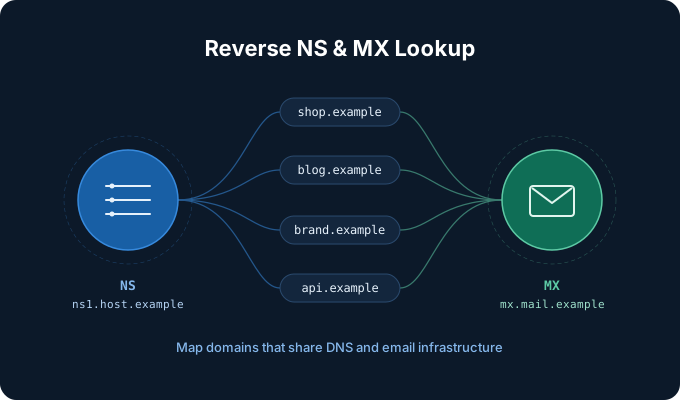
A reverse IP lookup tells you which domains live on the same server. But servers are only one layer of a website's infrastructure. Every domain also points to nameservers that answer its DNS queries and, if it receives email, to mail servers listed in its MX records. Looking at those two layers in reverse gives you a different and often sharper view of how domains are related.
This article explains what reverse NS and reverse MX lookups are, how to read their results without jumping to conclusions, and where they fit in a research workflow.
What is a reverse NS lookup?
Every registered domain delegates its DNS to one or more nameservers through NS records. For example, a domain might use dns1.registrar-servers.com and dns2.registrar-servers.com. A normal DNS query goes from the domain to its nameservers.
A reverse NS lookup goes the other way: you start with a nameserver and ask which domains are delegated to it. Because DNS itself has no built-in way to answer that question, reverse NS data comes from large datasets that record the NS records of millions of domains and index them by nameserver.
You can try it with our NS to Domains tool. Enter a nameserver such as ns1.hostgator.com, or enter a domain and the tool will look up its nameservers for you.
What is a reverse MX lookup?
MX records tell other mail servers where to deliver email for a domain. A domain using Google Workspace, for instance, has MX records pointing to aspmx.l.google.com and its backups.
A reverse MX lookup starts from a mail server and lists the domains whose MX records point to it. The MX to Domains tool works the same way as the NS tool: enter a mail server such as mx-in.g.apple.com, or enter a domain to use its MX records.
Shared versus private infrastructure: the key to reading results
The single most important thing to understand is that the meaning of a result depends almost entirely on how many domains share the server.
- Shared, public infrastructure. Registrar default nameservers, managed DNS providers, and large email platforms serve millions of unrelated customers. A nameserver like
dns2.registrar-servers.comis used by over ten million domains, andaspmx.l.google.comby even more. Two domains appearing on the same list here tells you only that they picked the same provider. - Private or dedicated infrastructure. A company that runs its own nameservers or mail servers usually uses them only for its own domains. Apple's inbound mail server
mx-in.g.apple.comreceives mail for a few dozen domains, nearly all of them Apple properties. Wikimedia's mail servers handle Wikipedia, Wiktionary, Wikidata, and the other Wikimedia projects. Here, a shared server is a strong signal of common ownership. - Hosting-company infrastructure. In between are nameservers and mail servers operated by a hosting company or reseller for its customers. Results are usually in the hundreds or thousands and show who uses that host, not who owns what.
As a rule of thumb, results in the millions describe a provider's market share, while results in the tens often describe an organization.
Why NS and MX are useful together with reverse IP
Each layer can change independently, so combining them helps you confirm or rule out a relationship:
- CDNs hide servers but not DNS or email. Domains behind a CDN share IP addresses with thousands of unrelated sites, which makes reverse IP results noisy. Their nameservers and mail servers are often more specific.
- Brands keep email in-house. Large organizations frequently move websites between hosts but keep a stable, private mail setup. A reverse MX lookup can surface subsidiaries, regional sites, and acquired brands, such as Microsoft's MX revealing domains from companies it has acquired.
- Agreement across layers is strong evidence. If two domains share a dedicated IP, a private nameserver, and the same mail host, they are very likely run by the same operator. Agreement on only a public provider means very little.
Common use cases
- Brand and asset discovery. Map the domains an organization actually operates, including forgotten marketing sites and regional variants, for security reviews or domain portfolio cleanup.
- Attack surface and bug bounty recon. Domains on a company's private nameservers or mail servers are good candidates for in-scope assets. Always confirm scope before testing anything.
- Phishing and fraud investigations. Malicious domains are often registered in batches and pointed at the same small nameserver or mail server. Finding one can lead you to the rest of the campaign.
- Competitive and market research. Reverse NS and MX results on a provider's infrastructure give a sample of who uses that DNS host or email platform.
- Migration planning. Before retiring an old nameserver or mail server, list every domain still pointing to it so nothing breaks unexpectedly.
How to run a lookup step by step
- Find the nameservers and mail servers of a domain you already know. The WHOIS lookup shows a domain's nameservers, or you can simply enter the domain into the NS or MX tool and it will resolve them for you.
- Check how many results the server has. Millions or hundreds of thousands point to a public provider; treat the list as a sample, not as related domains.
- If the count is small, review the domains for naming patterns, shared branding, or registration details. Open each interesting one in the WHOIS tool.
- Cross-check with the other layers: IPv6 to Domains or the reverse IP lookup for servers, and the other of NS or MX.
- Record what you found together with the date. DNS changes over time, so a domain that shared a nameserver last year may have moved since.
Limitations to keep in mind
- Data is a snapshot. Reverse lookup datasets are built from periodic scans, so very new domains or recent DNS changes may not appear yet, and some listed domains may have moved.
- Per-customer hostnames return little. Some email platforms, such as Microsoft 365, give each customer a unique MX hostname like
example-com.mail.protection.outlook.com. A reverse MX lookup on that host usually returns just the customer's own domains. - Large lists are truncated. For servers used by many domains, free lookups show the first part of the list. That is usually enough to recognize a shared provider; full exports are available on paid plans.
- Shared does not mean owned. A common server is a clue, not proof. Confirm relationships with additional evidence before acting on them.
Conclusion
Reverse NS and reverse MX lookups extend reverse IP research to the DNS and email layers of a domain's infrastructure. On public providers they show market share; on private infrastructure they can reveal an organization's whole domain footprint. Used together, and read with the size of the result in mind, they are a quick way to turn one known domain into a map of related ones.
Try it now with the NS to Domains and MX to Domains tools.