How to Find All Domains Hosted on One IP Address
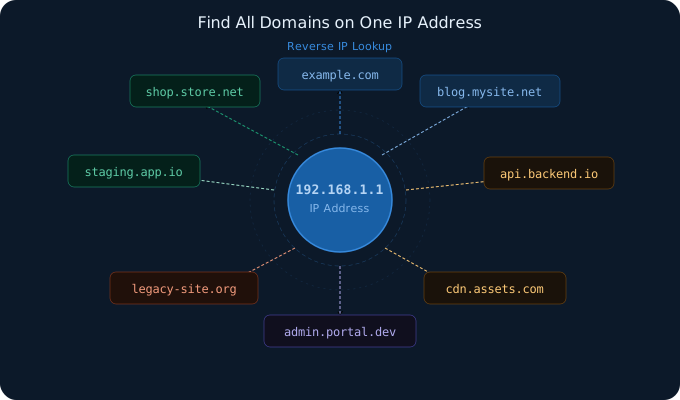
If you want to find all domains hosted on one IP address, the standard method is to use a reverse IP lookup tool. This process helps you identify websites and hostnames that appear to share the same server or infrastructure. It is useful for technical research, shared hosting analysis, security review, and understanding how public-facing services are grouped behind one IP.
What does it mean for multiple domains to share one IP?
One IP address can host many different domains. This is common in shared hosting, cloud platforms, reverse proxy setups, and content delivery environments. A server can be configured to answer requests for multiple hostnames even though they all point to the same IP address.
This means that when you look up an IP address, you may find one domain, dozens of domains, or even hundreds of domains that appear to be connected to that IP.
Why would you want to find all domains on one IP?
There are several practical reasons to do this:
- To investigate shared hosting relationships
- To review related websites on the same infrastructure
- To support reconnaissance and security research
- To identify additional public-facing services tied to a target
- To understand how a company or project distributes domains across servers
For example, if you know one website on a server, a reverse IP lookup may help you discover other domains on that same IP that reveal staging services, alternate brands, or legacy websites.
How to find domains hosted on one IP address
The process is straightforward:
- Start with an IP address.
- Open a reverse IP lookup tool.
- Enter the IP address into the lookup form.
- Review the domains returned by the result.
If you only have a domain and not the IP, you can first resolve the domain to its IP address and then run reverse IP lookup on that IP.
What reverse IP lookup actually tells you
A reverse IP lookup does not guarantee ownership of every domain on the result list. It only shows domains that appear to be hosted on or associated with the same IP address. That distinction matters.
In many cases, the result shows:
- Domains on the same shared server
- Sites using the same cloud or hosting provider node
- Sub-brands or related services under one infrastructure group
- Historical or partial associations depending on the data source
Because of that, reverse IP lookup should be treated as a discovery tool, not absolute proof of ownership.
Important limitations
Not every result means two domains are strongly related. There are several reasons:
- Shared hosting can place unrelated websites on the same IP
- Cloud platforms often reuse infrastructure heavily
- CDNs and reverse proxies may hide origin relationships
- Some data sources may not return every domain on an IP
This means the result list is most useful when combined with other checks such as WHOIS lookup, DNS review, subdomain discovery, and manual validation.
Best next steps after you get the result
After you find domains on one IP address, the next step is usually to enrich the result:
- Use a WHOIS lookup tool to inspect registrar and name server data
- Check whether some of the domains belong to the same owner or use the same registration patterns
- Review subdomains to understand the public footprint of a specific domain
- Use an API if you need to automate repeated lookups at scale
When this method is most useful
Finding all domains hosted on one IP address is especially useful when:
- You are investigating shared hosting infrastructure
- You are mapping public-facing systems for a technical review
- You are researching related websites on one server
- You need a faster way to discover additional domains tied to an IP
Conclusion
If you need to find all domains hosted on one IP address, reverse IP lookup is the right starting point. It gives you a practical way to discover related domains, inspect shared hosting environments, and expand your understanding of public infrastructure.
The key is to treat the result as a discovery layer. Once you have the list, you should validate and enrich it with WHOIS, DNS, and related tooling. Used correctly, reverse IP lookup can save time and reveal infrastructure relationships that are not obvious from a single domain alone.